Your Workspace — Where You and Claude Work Together
Your Workspace — Where You and Claude Work Together
A practical guide to bringing Claude into your real workflows, decisions, and connected tools.
- What a workspace is and why it matters
- Where Claude reads and saves files
- Set up your first workspace folder
When you open Claude Cowork, you can share a folder from your computer with it. Think of this as handing Claude a set of keys to your filing room.
It can read what's in that folder, create new files there, and update existing ones. Everything it creates lands right in your folder — no downloading, no moving files around.
Your workspace folder is your home base. Whatever you're working on, save it there and Claude can pick up where you left off — even in your next session.
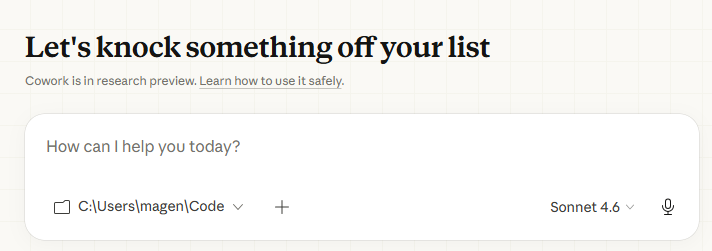
⚠️ Good to know: Cowork only has access to the folder you give it. It cannot see the rest of your computer unless you share more folders with it. Your files stay private and on your device.

Create a folder called Claude Projects.
Create subfolders: Emails, Reports, Research.
Point Claude Cowork to the new folder.
Think about this: What folder on your computer would make the most sense as your workspace? Most people use a project folder or a dedicated 'Claude Work' folder on their desktop.
In case you hear this term out there...
Workspace folder — The folder on your computer that you share with Claude Cowork. It reads from and saves files to this folder.
Session — One working conversation with Claude. You can pick up a new session any time — your workspace folder keeps the context.
✦ Your workspace folder is where Claude keeps all your files — you share it once, and it stays in sync.
✦Key Takeaway: Your workspace is the shared desk between you and Claude - keep it organized and Claude becomes more useful.
There are no comments for now.
to be the first to leave a comment.